H.264
H.264, also known as MPEG-4 AVC (Advanced Video Coding), is a video compression standard that offers significantly greater compression than its predecessors. H.264 is a lossy compression codec that uses interframe compression and contains different levels of quality.
The enhanced compression and perceptual quality of H.264 are obtained by motion estimation, which minimizes temporal redundancies also known by intra estimation (which minimizes spatial redundancies), transformation of motion estimation and intra estimation into the frequency domain (reduction of compression artifacts) and entropy coding, which assigns a smaller number of bits to frequently encountered symbols and a larger number of bits to infrequently encountered symbols.
XAVC
XAVC is a recording format that was introduced by Sony. XAVC uses level 5.2 of H.264/MPEG-4 AVC, which is the highest level supported by that video standard and can support 4K resolution (4096 × 2160 and 3840 × 2160) at up to 60 frames per second (fps). XAVC supports color depths of 8, 10, and 12 bits and the Chroma subsampling can be 4:2:0, 4:2:2, or 4:4:4. The Material Exchange Format (MXF) can be used for the digital container format.
XAVC allows for a wide range of content production including intra frame recording and long group of pictures (GOP) recording.
Showing posts with label BSA105. Show all posts
Showing posts with label BSA105. Show all posts
Monday, April 11, 2016

Sunday, April 10, 2016
BSA 105: Containers/Wrappers and Codecs (Lossy and Lossless)
What Is a Codec?
A codec is an encoding tool that processes video and stores it in a stream of bytes. Codecs shrinks the size of the audio or video file, and then decompress it when needed. There are dozens of different types of codecs, and each uses a different technology in order to encode and shrink your video file for the intended application.
Popular Codecs
1.XviD/DivX
DivX is a commercially sold codec, while XviD is the commercial cousin of DivX and it is an open source utility meant to function as an alternative. Both codecs can decode the output of the other, as they are both built on the implementation of MPEG-4. While still widely used, it is often strictly for video encoding and in conjunction with one of the more popular packs mentioned below.
2.MPEG-4
MPEG-4 is the most common streaming format and it consists of many parts, of which only MPEG-4 Part II is used for video coding. MPEG-4 Part II calls on video encoders such as DivX or XviD in order to encode the video, while audio is typically carried in MP3 format. Modern updates to MPEG-4 are now using H.264 as well.
3.H.264
H.264 can utilize both lossy and lossless compression depending on the settings you choose when encoding, such as frame rate, quality, and target file size. H.264 relies on x264 for encoded video (as well as others, such as DivX or XviD), and audio is often encoded using AAC or MP3 audio codecs depending on the size and quality you’re targeting. H.264 is touted as 1.5 to 2 times as efficient as basic MPEG-4 compression, which leads to smaller file sizes and seamless playback on more devices.
_______________________________________________________________________
What is a Container?
A container exists solely for the purpose of bundling all of the audio, video, and codec files into one organized package. Like a box where you put all your treasured stuff into. In addition, the container often contains chapter information for DVD or Blu-ray movies, metadata, subtitles, and/or additional audio files such as different spoken languages. These include Flash Vide (.flv, .swf), MKV and MP4 file formats.
_______________________________________________________________________
Lossy Compression
When looking for manageable file sizes, lossy compression is the most viable method available. It reduces the data size for physical storage but the downside is it will lose quality when expanded. These compression types include jpg, mp3, mp4 and H.264.
Lossless Compression
Lossless compression works much like a ZIP or RAR file in that after compressing and decompressing, the file is essentially the same. The file doesn’t lose much quality, but it’s not an efficient way to store large files because there isn’t much compression that actually takes place.

Information gathered from : All You Need to Know about Video Codecs, Containers, and Compression
A codec is an encoding tool that processes video and stores it in a stream of bytes. Codecs shrinks the size of the audio or video file, and then decompress it when needed. There are dozens of different types of codecs, and each uses a different technology in order to encode and shrink your video file for the intended application.
Popular Codecs
1.XviD/DivX
DivX is a commercially sold codec, while XviD is the commercial cousin of DivX and it is an open source utility meant to function as an alternative. Both codecs can decode the output of the other, as they are both built on the implementation of MPEG-4. While still widely used, it is often strictly for video encoding and in conjunction with one of the more popular packs mentioned below.
2.MPEG-4
MPEG-4 is the most common streaming format and it consists of many parts, of which only MPEG-4 Part II is used for video coding. MPEG-4 Part II calls on video encoders such as DivX or XviD in order to encode the video, while audio is typically carried in MP3 format. Modern updates to MPEG-4 are now using H.264 as well.
3.H.264
H.264 can utilize both lossy and lossless compression depending on the settings you choose when encoding, such as frame rate, quality, and target file size. H.264 relies on x264 for encoded video (as well as others, such as DivX or XviD), and audio is often encoded using AAC or MP3 audio codecs depending on the size and quality you’re targeting. H.264 is touted as 1.5 to 2 times as efficient as basic MPEG-4 compression, which leads to smaller file sizes and seamless playback on more devices.
_______________________________________________________________________
What is a Container?
A container exists solely for the purpose of bundling all of the audio, video, and codec files into one organized package. Like a box where you put all your treasured stuff into. In addition, the container often contains chapter information for DVD or Blu-ray movies, metadata, subtitles, and/or additional audio files such as different spoken languages. These include Flash Vide (.flv, .swf), MKV and MP4 file formats.
_______________________________________________________________________
Lossy Compression
When looking for manageable file sizes, lossy compression is the most viable method available. It reduces the data size for physical storage but the downside is it will lose quality when expanded. These compression types include jpg, mp3, mp4 and H.264.
Lossless Compression
Lossless compression works much like a ZIP or RAR file in that after compressing and decompressing, the file is essentially the same. The file doesn’t lose much quality, but it’s not an efficient way to store large files because there isn’t much compression that actually takes place.

It’s also important to note that codecs aren’t just for compression of audio and video files. Once a file
has been encoded using a specific codec, that same codec must be used to decode the file in order for it to play on your device. Not using the correct codec is what leads to the majority of device compatibility or playback issues. This issue is becoming less common as modern containers often include the required audio and video codecs needed to play the file.
Information gathered from : All You Need to Know about Video Codecs, Containers, and Compression
Monday, March 28, 2016
BSA105: Differences between PAL, NTSC and 23.98.
NTSC and PAL are two types of color encoding systems that affect the visual quality of content viewed on analog televisions and, to a much smaller degree, content viewed on HDTVs. While NTSC delivers a frame rate of 30 frames per second (fps) at an aspect ratio of 720x480, PAL uses a frame rate of 25 fps and a 720x576 aspect ratio. The PAL system offers automated color correction compared to NTSC's manual color correction.

Differences in Color Encoding in PAL and NTSC
The PAL standard manages color automatically, using phase alternation of the color signal that removes hue errors. Also, chrominance phase errors are eliminated in PAL systems. NTSC receivers have a manual tint control for color correction, so if colors are off-hue, the higher saturation of NTSC systems makes them more noticeable and an adjustment has to be made.
Another technical aspect is that the alternating color information — Hanover bars — can lead to grainy pictures if there are extreme phase errors. This can even happen in PAL systems, especially if decoder circuits are not properly aligned, or with early-generation decoders. However, extreme phase shifts of this nature are seen more often in ultra high frequency (UHF) signals (less robust than VHF), or in areas where terrain or infrastructure limit transmission paths and affect signal strengths.
A PAL decoder can be seen as a pair of NTSC decoders:
PAL can be decoded with two NTSC decoders.
By switching between the two NTSC decoders every other line it is possible to decode PAL without a phase delay line or two phase-locked loop (PLL) circuits.
This works because one decoder receives a color sub carrier with negated phase in relation to the other decoder. It then negates the phase of that sub carrier when decoding. This leads to smaller phase errors being cancelled out. However a delay line PAL decoder gives superior performance. Some Japanese TVs originally used the dual NTSC method to avoid paying royalty to Telefunken.
PAL and NTSC have slightly divergent colour spaces, but the color decoder differences here are ignored.
PAL supports SMPTE 498.3 while NTSC is compliant with EBU Recommendation 14.
The issue of frame rates and color sub carriers is ignored in this technical explanation. These technical details play no direct role (except as subsystems and physical parameters) to the decoding of the signal.
_______________________________________________________________________
23.98 Frame per second (FPS)
Most people will consider frame rate as 24 fps but it actually means 23.98fps. The actual NTSC video frame rate is 29.97 fps while the film frame rate is modified to 23.98 fps in order to create the 3:2 pattern.
Differences in Color Encoding in PAL and NTSC
The PAL standard manages color automatically, using phase alternation of the color signal that removes hue errors. Also, chrominance phase errors are eliminated in PAL systems. NTSC receivers have a manual tint control for color correction, so if colors are off-hue, the higher saturation of NTSC systems makes them more noticeable and an adjustment has to be made.
Another technical aspect is that the alternating color information — Hanover bars — can lead to grainy pictures if there are extreme phase errors. This can even happen in PAL systems, especially if decoder circuits are not properly aligned, or with early-generation decoders. However, extreme phase shifts of this nature are seen more often in ultra high frequency (UHF) signals (less robust than VHF), or in areas where terrain or infrastructure limit transmission paths and affect signal strengths.
A PAL decoder can be seen as a pair of NTSC decoders:
PAL can be decoded with two NTSC decoders.
By switching between the two NTSC decoders every other line it is possible to decode PAL without a phase delay line or two phase-locked loop (PLL) circuits.
This works because one decoder receives a color sub carrier with negated phase in relation to the other decoder. It then negates the phase of that sub carrier when decoding. This leads to smaller phase errors being cancelled out. However a delay line PAL decoder gives superior performance. Some Japanese TVs originally used the dual NTSC method to avoid paying royalty to Telefunken.
PAL and NTSC have slightly divergent colour spaces, but the color decoder differences here are ignored.
PAL supports SMPTE 498.3 while NTSC is compliant with EBU Recommendation 14.
The issue of frame rates and color sub carriers is ignored in this technical explanation. These technical details play no direct role (except as subsystems and physical parameters) to the decoding of the signal.
_______________________________________________________________________
23.98 Frame per second (FPS)
Most people will consider frame rate as 24 fps but it actually means 23.98fps. The actual NTSC video frame rate is 29.97 fps while the film frame rate is modified to 23.98 fps in order to create the 3:2 pattern.
Monday, March 21, 2016
BSA105: Diffrences between RGB and YUV colour space (Week 4)
What is a colour space?
Colour space, also known as the colour model (or colour system), is an abstract mathematical model which simply describes the range of colors as tuples of numbers, typically as 3 or 4 values or color components (e.g. RGB). It is an elaboration of the coordinate system and sub-space. Each colour in the system is represented by a single dot.
RGB Colour Space
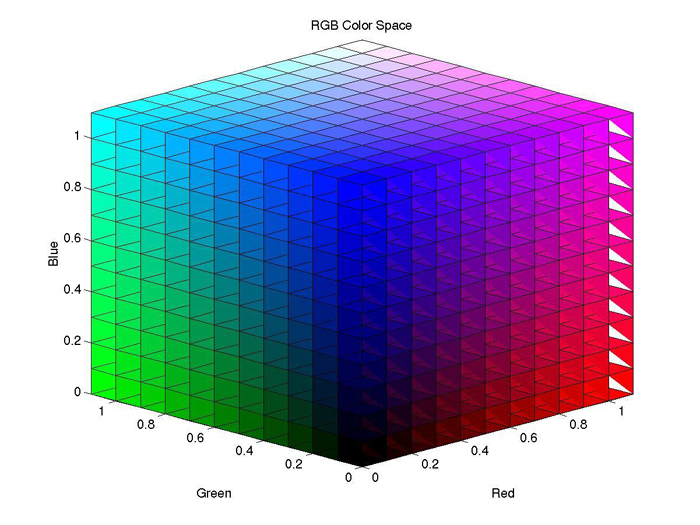
RGB is a kind of color space which uses RED, GREEN and BLUE to elaborate colour model. An RGB colour space can be simply interpreted as "all possible colours" which can be made from three colours for red, green and blue. In such conception, each pixel of an image is assigned a range of 0 to 255 intensity values of RGB components. That is to say, using only these three colours, there can be 16,777,216 colours on the screen by different mixing ratios.
YUV Colour Space
The Y component determines the brightness of the colour (referred to as luminance or luma), while the U and V components determine the colour itself (the chroma). Y ranges from 0 to 1 (or 0 to 255 in digital formats), while U and V range from -0.5 to 0.5 (or -128 to 127 in signed digital form, or 0 to 255 in unsigned form). Some standards further limit the ranges so the out-of-bounds values indicate special information like synchronization.
One neat aspect of YUV is that you can throw out the U and V components and get a grey-scale image. Since the human eye is more responsive to brightness than it is to colour, many lossy image compression formats throw away half or more of the samples in the chroma channels to reduce the amount of data to deal with, without severely destroying the image quality.

Friday, March 4, 2016
BSA105: Stages of Offline Editing (Week 3)
Unlike the previous post, we also went through camel case.
Camel case is when you name a project and the start of it has to be in small letters.
For example: bSA105_SngWeeJie_(Filename).mov
As you can see, the b in BSA in small and the first letter of my full name is all in Capital. This works like a camel hump.
General Stages of Offline Editing
Logging - A process in which video footage is watched, organized and labeled according to its content.
First Assembly Edit - Piecing the shots together as written in the script/storyboard.
Rough Cut - The first stage in which the film begins to resemble its final product. Rough cuts do not flow well and still undergo many changes before the release of the film.
Fine Cut - The fine cut no longer focuses on the entire film, but on the details of each and every cut. The fine cut emphasises and strengthens the rhythms and structures identified in the Rough cut.
Final Cut (Picture Lock) - When a fine cut has been agreed with the editor, director and producer, the sound designer, music composer and title designer join the editor. Sound effects and music are created and added to the final cut. When everyone has agreed with the final cut, the Edit Decision List is sent to the lab where a negative cutter ‘conforms’ the negative to the EDL in order to create a negative that is an exact copy of the final cut.
Camel case is when you name a project and the start of it has to be in small letters.
For example: bSA105_SngWeeJie_(Filename).mov
As you can see, the b in BSA in small and the first letter of my full name is all in Capital. This works like a camel hump.
General Stages of Offline Editing
Logging - A process in which video footage is watched, organized and labeled according to its content.
First Assembly Edit - Piecing the shots together as written in the script/storyboard.
Rough Cut - The first stage in which the film begins to resemble its final product. Rough cuts do not flow well and still undergo many changes before the release of the film.
Fine Cut - The fine cut no longer focuses on the entire film, but on the details of each and every cut. The fine cut emphasises and strengthens the rhythms and structures identified in the Rough cut.
Final Cut (Picture Lock) - When a fine cut has been agreed with the editor, director and producer, the sound designer, music composer and title designer join the editor. Sound effects and music are created and added to the final cut. When everyone has agreed with the final cut, the Edit Decision List is sent to the lab where a negative cutter ‘conforms’ the negative to the EDL in order to create a negative that is an exact copy of the final cut.
BSA101 & BSA105 - Week 3 (Linked study of Histogram, Waveform and Lumier)
In this weeks class of BSA101 and BSA105, we looked through some other functions on the camera and premier pro and what they do. We went through Historgram, Waveform, White Balance and Lumetri Scopes. I found that they link together because of the similarities they have with each other on the camera and premier pro.
Vectorscope
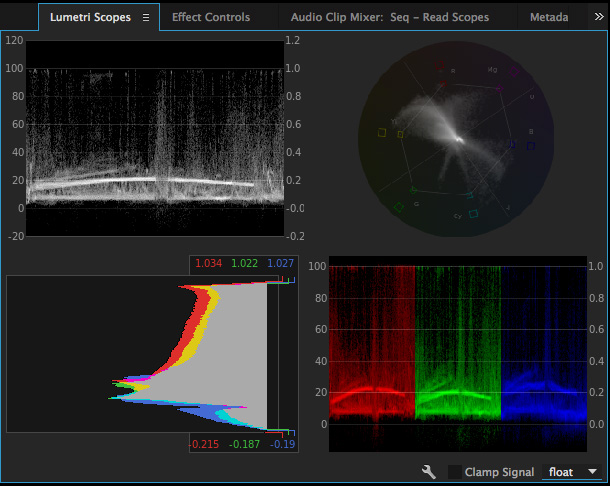
The Vectorscope displays the video’s chrominance information in a a circular chart. Saturation is measured from the center of the chart outward.
Vectorscopes work in YUV and HLS (Hue, Lightness, Saturation) modes. The YUV Vectorscope uses the more familiar YUV color space including color targets to display the pixel distribution in your images more intuitively. The YUV vectorscope is the default option.
Histogram
Histogram shows RGB values. The minimum Luma values per channel are displayed as numerical feedback at the bottom. Maximum values are displayed at the top. Two horizontal lines indicate the output range. Similar to the Histogram in Photoshop, it shows the distribution of pixels in an image from pure black at the bottom to pure white at the top.
RGB Parade
RGB Parade scope displays separate waveforms for the red, green, and blue components of an image. The waveforms are displayed side by side, making it easy to compare the relative levels of reds, greens, and blues in an image, and make adjustments as required. The RGB Parade scope also makes it easy to spot color casts in your image.
Waveform Monitor or Luma Waveform
It displays the gray-scale values in the image under the playhead, where high luma levels appear as spikes on the waveform, and low luma levels appear as dips. This scope lets you quickly identify highlights and shadows in your image, helping you achieve precise black-and-white balancing. (Something like exposure)
*Clamp Signal : To lock the lumetri scope at 100%*
There are five scopes to choose from in premier pro, which you can access by clicking the Wrench icon in the lower right corner of the scopes panel:
- Vectorscope HLS (Hue, Light, Saturation)
- Vectorscope YUV
- Histogram
- Parade (RGB or YUV)
- Waveform Monitor or Luma Waveform
Vectorscope
The Vectorscope displays the video’s chrominance information in a a circular chart. Saturation is measured from the center of the chart outward.
Vectorscopes work in YUV and HLS (Hue, Lightness, Saturation) modes. The YUV Vectorscope uses the more familiar YUV color space including color targets to display the pixel distribution in your images more intuitively. The YUV vectorscope is the default option.
Histogram
Histogram shows RGB values. The minimum Luma values per channel are displayed as numerical feedback at the bottom. Maximum values are displayed at the top. Two horizontal lines indicate the output range. Similar to the Histogram in Photoshop, it shows the distribution of pixels in an image from pure black at the bottom to pure white at the top.
RGB Parade
RGB Parade scope displays separate waveforms for the red, green, and blue components of an image. The waveforms are displayed side by side, making it easy to compare the relative levels of reds, greens, and blues in an image, and make adjustments as required. The RGB Parade scope also makes it easy to spot color casts in your image.
Waveform Monitor or Luma Waveform
It displays the gray-scale values in the image under the playhead, where high luma levels appear as spikes on the waveform, and low luma levels appear as dips. This scope lets you quickly identify highlights and shadows in your image, helping you achieve precise black-and-white balancing. (Something like exposure)
*Clamp Signal : To lock the lumetri scope at 100%*
Monday, February 29, 2016
BSA 105: Basic Video Editing (Week 2)

For this weeks class, we went through some basic functions and commands on Adobe Premiere Pro.
A folder is called a Bin when it comes to editing. We were also told to organize our imported video edits, effects, photos, etc, etc into the own and personal Bin respectively.
Ripple edits: Q (Trim head), W (Trim Tail)
Pointer tool: V
Razor tool: C (Cut the Video and Audio at the same time)
Rolling Edit: N (Moving an edit point without affecting the rest of the timeline/sequence)
Ripple edit: B (Moving an edit point and causing the rest of the timeline to move the same amount to compensate)
Zoom: + and - (Zoom in and out respectively on the timeline/sequence)
"Home and End" Button: Jump between the start and end of the timeline/sequence
Split edits - J-Cut (Leading in with the Audio), L-Cut (Leading in with the Video)

A: Clip trimmed for J-Cut, B: Clip trimmed for L-Cut
Monday, February 22, 2016
BSA 105 : Film Editing (Week 1)
In our first week of class, we did some introduction on the handbook and the requirements for us to pass this subject. We also went through both of the assessment which was Multi-choice examination for the first assessment, a Dramatic Chase Sequence footage for the second assessment, an edited interview which must be 3 - 5 minute in duration for the third assessment and a blog for the rest of the semester.
We were shown some videos related to film editing on youtube from a channel called Filmmaker IQ. The videos shows us the history of how film making came into process and how the technological products (i.e camera, lenses) came into the industry.
We were shown some videos related to film editing on youtube from a channel called Filmmaker IQ. The videos shows us the history of how film making came into process and how the technological products (i.e camera, lenses) came into the industry.
Subscribe to:
Posts (Atom)